
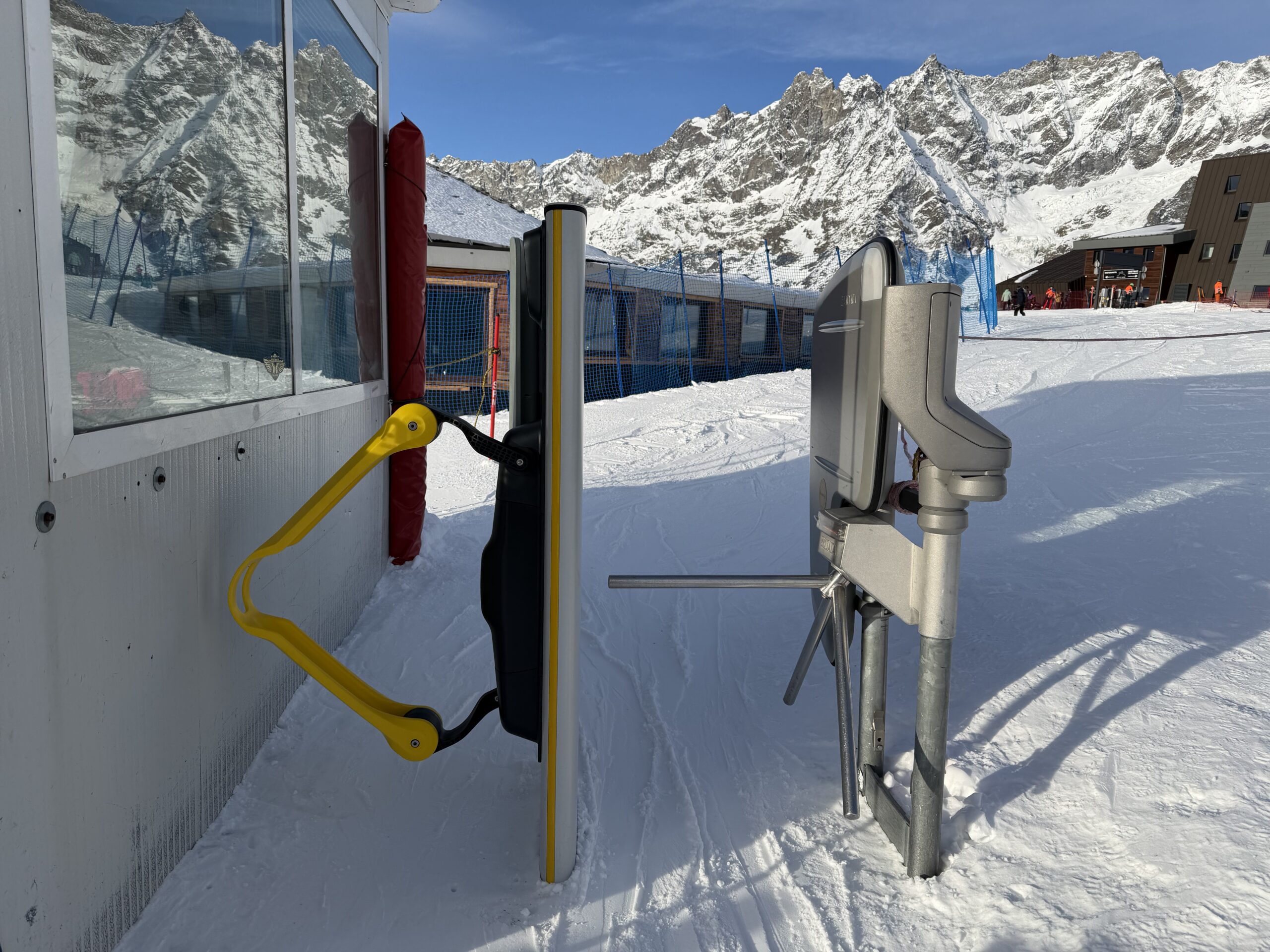
Planning a ski holiday in Cervinia? There is one practical detail worth organising before you arrive: your ski pass.
For the 2026/2027 winter season, Cervino Ski Paradise offers the Mobile Skipass, a digital ski pass that allows you to purchase your ticket online, activate it through the official Cervino Ski app and access enabled ski lift gates using your smartphone.
Instead of carrying a traditional physical ski pass, you can keep your ticket on your phone and enjoy a more convenient start to your day on the mountain.
But how does it work? Which phones are compatible? Do you need to show a QR code? And can you use the same system throughout the Cervinia ski area?
In this guide, I’ll explain everything you need to know before using the Cervinia Mobile Skipass, including the practical details that can save you time and prevent unnecessary frustration on your ski holiday.
As a private ski instructor based in Cervinia, I know how much smoother a ski day can be when the basics are organised in advance. Sorting out your ski pass before heading to the lifts is a simple way to get your holiday off to the right start.
What Is the Cervinia Mobile Skipass?
The Cervinia Mobile Skipass is a digital ski pass that works directly from your smartphone.
You purchase your ticket online, load it into the official Cervino Ski app and activate it before skiing. At compatible lift gates, the system uses Bluetooth Low Energy (BLE) technology to recognise your ticket.
This means that, at enabled gates, you don’t need to take your phone out of your pocket or display a QR code every time you pass through a turnstile.
The QR code is used during the setup process to load your purchased ticket into the app. Once your Mobile Skipass is activated, the compatible gates can recognise it automatically.
The main advantages are straightforward:
- No physical ski pass card to carry.
- Online purchase before reaching the resort.
- Access through enabled gates using Bluetooth.
- Less time spent organising your ticket at the start of the day.
- A more convenient way to manage your ski pass.
The system is designed to make accessing the lifts easier, allowing you to spend more time enjoying the slopes.
Official information and purchases: Visit the Cervino Ski Paradise website and select the Mobile Skipass section or access the official ski pass shop.
How to Buy a Cervinia Mobile Skipass
Buying your ski pass is straightforward, but there are a few steps to complete before you can use it on the mountain.
Step 1: Download the Official Cervino Ski App
Start by downloading the official Cervino Ski app onto your smartphone.
Register or sign in and make sure your phone meets the current compatibility requirements.
I recommend doing this before travelling to Cervinia rather than waiting until you are standing in front of a lift gate.
Step 2: Purchase Your Ski Pass Online
Choose the ski pass you need through the official Cervino Ski Paradise online shop.
Check the destination, the type of ticket and the dates before completing your purchase.
If you’re staying for several days, compare the available options to find the pass that best matches your plans.
You can also read my guide to Cervinia Ski Pass Prices 2026/2027 to understand the different ticket options and plan your ski holiday budget.
Step 3: Scan the QR Code
After purchasing your Mobile Skipass, follow the instructions to load your ticket into the Cervino Ski app using the QR code provided.
This is part of the initial setup process.
You don’t need to display the QR code at every lift gate once your ticket has been correctly loaded and activated.
Step 4: Activate Your Mobile Skipass
Complete the activation process in the app.
Make sure Bluetooth is switched on and that the app has the permissions it requires to operate correctly.
Don’t leave activation until you reach the first lift. Complete the process in advance and check that your ticket appears correctly in the app.
Step 5: Put Your Phone in the Correct Pocket
Cervino Ski Paradise recommends keeping your smartphone in a chest pocket, preferably on the left-hand side.
This position helps the system recognise your ticket when you approach an enabled gate.
Avoid placing your phone somewhere that makes it difficult for the system to detect it.
Step 6: Head to an Enabled Lift Gate
Look for the gates marked with the Mobile Skipass symbol.
Approach the gate normally, keeping your phone in the recommended pocket. The system should recognise your active ticket through Bluetooth.
If everything has been set up correctly, you can pass through without taking your phone out.
Does the Cervinia Mobile Skipass Work on Every Lift?
This is one of the most important things to understand before choosing a digital ski pass.
No, Mobile Skipass access is available only at enabled gates.
Cervino Ski Paradise is progressively expanding the technology across its ski areas, so you should check the latest information before skiing.
There is also an important distinction between the different resorts.
According to the official Mobile Skipass information currently published for the 2026/2027 winter season, smartphone access is not yet available at Torgnon and Chamois.
Holders of eligible mobile multi-day tickets, where offered, and Mobile season passes who wish to ski at those resorts must first visit the ticket office to obtain a replacement daily ski pass for access to the lifts.
If your plans involve more than one resort, don’t assume that a mobile ticket will work in exactly the same way everywhere.
Before setting off, check the official instructions for the specific destination you intend to visit.
For a holiday based mainly in Breuil-Cervinia and Valtournenche, the Mobile Skipass offers a convenient way to access enabled lift gates, but it’s still worth checking the latest information for your planned routes.

Which Smartphones Are Compatible?
Before buying a Mobile Skipass, check that your smartphone meets the current requirements.
The official compatibility information currently lists the following:
| Device | Published requirement |
|---|---|
| Apple iPhone | iPhone 6s or later |
| Apple operating system | iOS 13 or later |
| Android smartphones | Android 14 or later, subject to exclusions |
| Excluded Android brands | Huawei, Oppo, OnePlus and Honor |
| Phone condition | Must be switched on and working |
| Bluetooth | Must be enabled |
| App permissions | Required permissions must be granted |
These are the requirements published on the official Mobile Skipass page at the time of writing. Device compatibility can change, so check the latest requirements in the Cervino Ski app before purchasing your ticket.
If you have an older phone, a device from one of the excluded brands or any doubts about compatibility, verify everything before paying for your ski pass.
It is much easier to solve a compatibility problem at home than at the bottom of a busy lift station.
What Happens If Your Phone Battery Runs Out?
This is probably the most important practical question.
The Mobile Skipass requires your smartphone to be switched on and functioning. If your phone runs out of battery, you cannot rely on the digital ticket working as intended.
My advice is simple: start the day with a fully charged phone.
Cold temperatures can affect battery performance, particularly when you spend several hours outdoors in winter. Using your phone for photographs, videos, navigation and messaging can also drain the battery more quickly than expected.
To reduce the risk of running out of power:
- Charge your phone fully before leaving your accommodation.
- Keep it in an inside pocket to protect it from the cold.
- Avoid unnecessary battery use while skiing.
- Consider carrying a small power bank if your phone battery is unreliable.
- Check your battery level during breaks.
Cervino Ski Paradise also states that dedicated stations are available at major lift facilities where you can obtain portable power banks to recharge your smartphone.
Check the current availability and instructions for this service before relying on it.
If you’re skiing all day, especially in cold weather, a little preparation can make a big difference.

Do You Need to Show Your QR Code at the Lift Gates?
No.
This is a common point of confusion.
The QR code is used to load your purchased ticket into the Cervino Ski app. At enabled gates, the Mobile Skipass is recognised using Bluetooth Low Energy technology.
You should therefore activate the ticket before skiing, enable Bluetooth and keep your smartphone in the recommended chest pocket.
You don’t need to take the phone out and show the QR code each time you pass through a compatible turnstile.
If the gate doesn’t recognise your ticket, check that the phone is switched on, Bluetooth is enabled, the ticket is active and the app has all the necessary permissions.
Also make sure you are using a gate that supports Mobile Skipass.
How to Avoid Problems With Your Mobile Ski Pass
A little preparation can help you avoid delays when you arrive at the lifts.
Here is the checklist I recommend following before your first ski day.
Before Leaving Home
- Download the official Cervino Ski app.
- Check that your phone is compatible.
- Register or sign in.
- Purchase the correct ski pass.
- Load your ticket into the app.
- Complete the activation process.
- Check that Bluetooth is enabled.
- Make sure the required app permissions are granted.
- Charge your phone fully.
Before Approaching the First Lift
- Keep your phone switched on.
- Put it in the recommended chest pocket, preferably on the left-hand side.
- Look for the Mobile Skipass symbol.
- Follow the instructions displayed at the lift entrance.
If you have any doubts, ask the ticket office or the resort’s official support team for assistance before starting your day.
Is the Mobile Skipass Better Than a Traditional Ski Pass?
For many skiers, the main advantage is convenience.
You can purchase your ticket online, prepare it in advance and avoid carrying a separate physical card.
However, the best option depends on your circumstances.
The Mobile Skipass is particularly appealing if you have a compatible smartphone, are comfortable using apps and want to organise everything digitally.
A traditional physical ski pass may be more practical for someone whose phone is incompatible, has a poor battery or prefers not to depend on a smartphone while skiing.
Families should also consider how each member of the group will manage their ticket. If several people are skiing together, check the individual requirements and arrangements for every ticket before purchasing.
The important thing is to choose the option that works reliably for you rather than assuming that a digital ticket is automatically the best solution for everyone.
Can You Use the Mobile Skipass for a Multi-Day Ski Holiday?
The official Mobile Skipass information covers digital access arrangements, including certain multi-day and season tickets where available.
However, the exact products and conditions depend on the ticket you purchase and the resort where you intend to ski.
If you’re spending four, five or six days in Cervinia, make sure you select a ticket that covers the dates and areas you need.
If you’re planning to cross into Zermatt, check the specific conditions of the international ski pass you intend to buy. Don’t assume that every mobile ticket includes access to the entire Cervinia–Zermatt ski area.
You can find more practical information in my Cervinia Ski Pass Prices 2026/2027 guide.
And if you’re still organising your trip, my Cervinia Ski Slopes Guide can help you understand the different areas of the mountain and plan your days according to your skiing level.
Is the Mobile Skipass More Environmentally Friendly?
A digital ski pass reduces the need for a physical plastic card.
This is one of the advantages highlighted by Cervino Ski Paradise as part of its digital approach to lift access.
For the skier, it also means one less physical item to remember, carry and potentially lose during the day.
The main purpose of the system, however, is convenience: making the process of purchasing and using a ski pass simpler through smartphone technology.
Planning Your Ski Holiday in Cervinia? A Few More Tips
Organising your ski pass is only one part of preparing for a great ski holiday.
Before arriving, I recommend checking the following:
Lift and piste openings. Weather, wind, snow conditions and operational decisions can affect which lifts and pistes are open. Check the latest information before setting off.
Your ski equipment. If you need to rent skis or boots, organise this in advance where possible, particularly during busy periods.
Your ski lessons. If you’d like to improve your technique or explore the mountain with a private instructor, booking ahead gives you more choice over dates and times.
Your itinerary. Think about your skiing level and the areas you want to explore. Cervinia offers a wide range of terrain, but the best plan depends on your experience and the conditions.
As a private ski instructor based in Cervinia, I always recommend preparing the essentials before the first morning. Once your equipment, ski pass and plans are sorted, you can spend less time organising and more time enjoying the mountain.
If you’d like a more personal introduction to the resort, you can also read my guide to planning a ski holiday in Cervinia.
Frequently Asked Questions About the Cervinia Mobile Skipass
How do I buy a Cervinia Mobile Skipass?
Download the official Cervino Ski app, register and purchase your ticket through the official Cervino Ski Paradise shop. Follow the instructions to load the ticket into the app and activate it before skiing.
Do I need to show my phone at the lift gate?
No. At enabled gates, the ticket is recognised using Bluetooth Low Energy technology. Keep your activated ticket on your smartphone and place the phone in the recommended chest pocket.
Do I need Bluetooth switched on?
Yes. Bluetooth must be enabled, and the app must have the permissions required for the Mobile Skipass to work.
What happens if my smartphone runs out of battery?
The Mobile Skipass requires your phone to be switched on and working. Charge it before skiing and consider carrying a power bank. Check the resort’s current guidance if you experience a problem.
Does Mobile Skipass work on every lift in Cervinia?
It works at enabled gates. Check the latest official information to confirm which lifts support the technology.
Can I use Mobile Skipass at Torgnon and Chamois?
According to the official information currently published, smartphone access is not yet available at Torgnon and Chamois. Eligible mobile multi-day and season-pass holders must visit the ticket office for a replacement daily ski pass where the published rules require it.
Which iPhones are compatible?
The published requirements currently list iPhone 6s and later, running iOS 13 or later. Always check the latest compatibility information before purchasing.
Which Android phones are compatible?
The published requirements currently list Android 14 or later, excluding Huawei, Oppo, OnePlus and Honor devices. Confirm compatibility in the official app before purchasing your ticket.
Should I buy my ski pass before arriving in Cervinia?
Buying online and completing the setup in advance can make your first morning easier. Make sure you’ve selected the correct ticket and checked the dates, destination and compatibility of your phone.
Where can I check lift and piste openings?
Use the official Cervino Ski Paradise website or app for the latest lift, piste and weather information. Conditions can change throughout the day.

Final Thoughts: Spend Less Time Organising and More Time Skiing
The Cervinia Mobile Skipass is a convenient way to organise your ski ticket directly on your smartphone.
Once you’ve checked compatibility, purchased your ticket, loaded it into the official app and activated it correctly, accessing enabled lift gates becomes much simpler.
Just remember the essentials: keep your phone charged, enable Bluetooth, use the recommended pocket and check which gates support the system.
And don’t forget that the best ski day starts with a little preparation.
If you’re planning a trip to Cervinia, take a look at my other guides to ski passes, ski slopes and organising your holiday. They can help you arrive prepared and make the most of your time on the mountain.
If you would like help choosing the right ski lesson or planning your days on the slopes, you can also contact me directly at info@skiwithriky.com.
See you on the slopes,
Riky
Follow me, I’ll show you the way.